
Platform roadmap · All modules
In-depth, illustrated overview for prospects, SMEs and fiduciaries: which modules exist, what you see, how they connect — without prices.
In short
Live today (Core CH): Taxes · Comply · Sales · Banking — linked through the Data Vault and Connect AI.
Workspaces: Cockpit (steering/KPIs) and Dashboard (operations) — each only with permission.
Standard roles in the base: Owner · Employee · Fiduciary.
Next: Accounting · Payments (deeper) · Time tracking.
Later: CO₂ · Supply chain · Production · Customs · Inventory · Payroll · Insights · more add-ons.
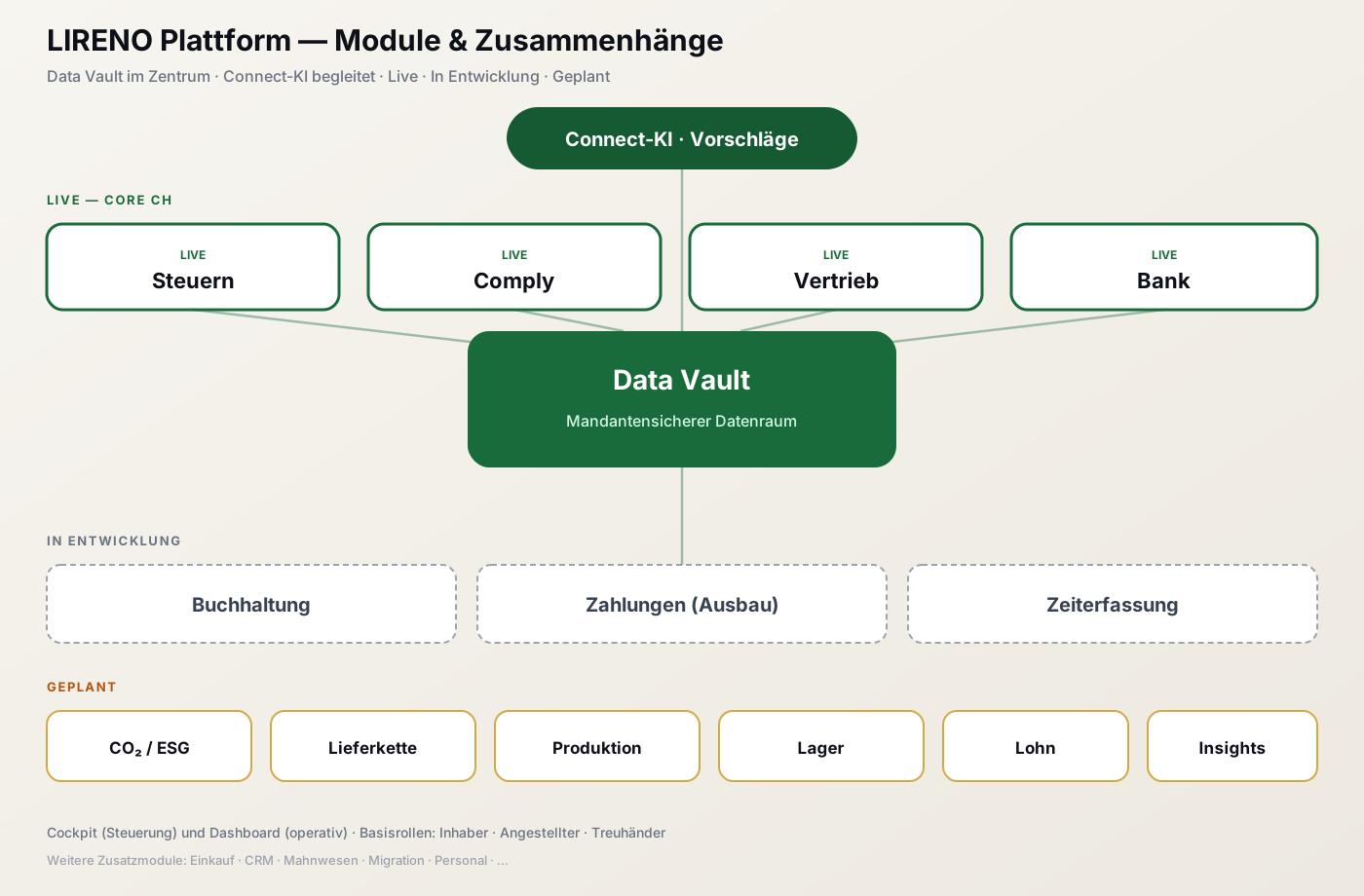
Overview: Live (Core CH) · In development · Planned (CO₂, supply chain, production, inventory, payroll, insights).
Why modules instead of one giant ERP
LIRENO is a platform of clear building blocks. Start with what you need (often Tax), then grow — without switching systems or duplicating master data.
| Idea | What it means |
|---|---|
| One tenant = one data space | Company, receipts, customers and payments stay linked |
| AI suggests, you decide | Accounts, rates, matching — you approve |
| Fiduciaries & companies | Same modules, separate roles and approvals |
| CH first, DACH in view | VAT, Swiss QR, ESTV/AGOV — architecture ready for DE/AT |
Getting in: login, cockpit & dashboard
After sign-in you use Cockpit and/or Dashboard, depending on permission.
| Workspace | Purpose | Access |
|---|---|---|
| Cockpit | Steering, KPIs, tenant overview | only with «Cockpit» permission |
| Dashboard | Day-to-day work in Taxes · Comply · Sales · Banking | only with «Dashboard / modules» permission |
Without the matching permission, that workspace is unavailable — even if the module is unlocked for the tenant.
Standard roles in the base
| Role | Typical use |
|---|---|
| Owner | Full access: setup, roles, cockpit and modules |
| Employee | Operational work per assigned rights (often dashboard/modules) |
| Fiduciary | Manages one or more tenants (THD-…) — same core modules per tenant |
Further roles (e.g. via the HR / Team add-on) are not part of the base standard roles.

Three base roles control access to Cockpit and Dashboard.
Cockpit — steering and entry to the core modules (with permission).
→ Getting started · Login · Core CH offering
Setup: company & bank master data
Gear setup is the foundation — not the same as the operational Banking menu.
Bank master data (IBAN/accounts) in Setup — basis for refunds and payments.
How modules connect
Typical money flow
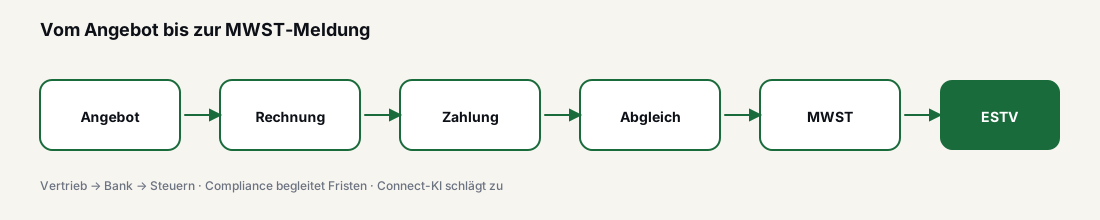
Live today — core modules (Core CH)
Tax Live
Receipt list — captured invoices and slips in the Tax module.
Links: Sales invoices and bank payments improve the VAT base. Comply flags deadlines.
→ Tax · ESTV/AGOV filing
Sales Live
Links: Invoice → open items → bank reconciliation → turnover in Tax. Designer controls layout.
Compliance Live
Comply feed — regulatory notes and AI assessment in tenant context.
→ Comply
Banking Live
→ Banking · Bank Sync (planned)
Platform around it
Connect AI Partly live
Suggestions in the workflow — human-in-the-loop. Do not paste secrets into chat.
Document Designer Available
Templates and layout for quotes/invoices, PDF with Swiss QR.
Microsoft 365 Integration
Outlook/contacts — available, not Core CH mandatory.
Next expansion stages
Accounting (LEDGER) In development
→ Ledger
Time tracking (TIME) In development
→ Time
Later / target picture
CO₂ / Sustainability (ESG) Planned
Scope 1–3, supply-chain emissions and ESG reports — on the same tenant data as Taxes and Comply.
Supply chain Planned
Suppliers, origin, risk and sustainability scoring — linked to sales, inventory and CO₂.
Customs (Zoll) Planned
Import/export, tariff lines, duties — CH · DE · AT. See Customs.
Production · Inventory Planned
Work orders, BOMs, stock and counts — foundation for manufacturing and supply chain.
| Module | Status |
|---|---|
| CO₂ / ESG · Supply chain · Production · Customs · Inventory | Planned |
| Payroll · Insights | Planned |
| Procurement / CRM / Dunning / Migration | Planned / partial |
| HR / Team | Partial (add-on) |
→ Module catalogue · What is offered now